Active minutes, across visits
A return visit counts too. Synced sessions help you see time spent reading rather than time a tab stayed open.
 ReadingTrack
Your online reading adds up. See the time, topics and sources behind it—and find your way back to the articles that made you think.
Online articles. Your own pace. Free to get started.
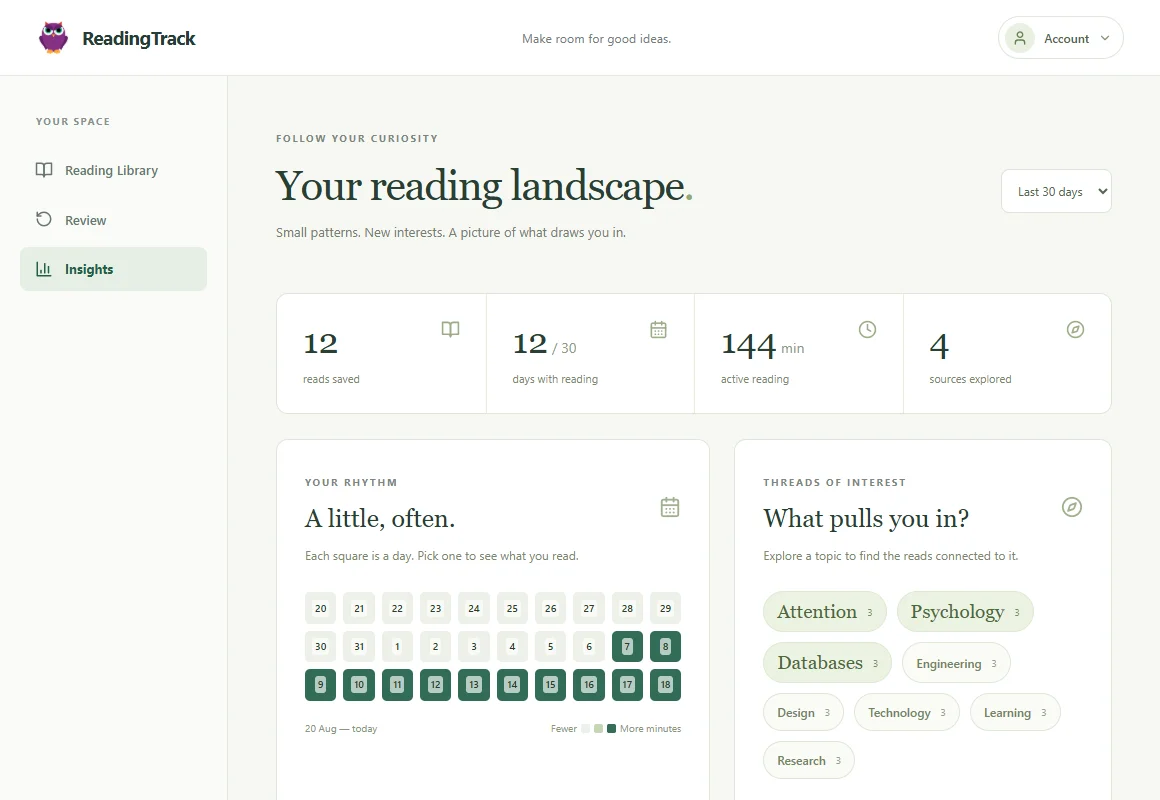
Maybe it was a new interest. Maybe the same topic kept drawing you back. Start with a question, then follow the evidence in your own reading.
A return visit counts too. Synced sessions help you see time spent reading rather than time a tab stayed open.
Choose a 7-, 30- or 90-day window. Select a day in the activity calendar to find the reads behind it.
Explore frequent topic tags and your source count. Select a topic to see the articles connected to it.
Separate your saved reads from progress and activity. A growing library and a reading habit are different things.
You don’t need a perfect streak to learn something about your reading. Look at a busy week, a quiet month, or a subject you keep returning to.
Minutes describe activity. Topic tags describe content. Neither tells you how much you understood—and neither needs to.
Start with the articles behind the numbers →Add an article URL on the website or choose Save page in the Chrome extension.
Use the extension to track active time on saved pages. Add a highlight, note or takeaway.
Explore your history and Insights. Return to a source or start a short review.
Save links on the website. Active reading-time tracking requires the Chrome extension.
What the product does, where it helps, and what the numbers mean.
The Chrome extension records active time on saved pages while the page is visible and focused. It stops counting after inactivity. Separate visits add up. This is an estimate of activity, not a test of attention or understanding.
No. Insights separates reads saved from active reading time and shows saved, in-progress and read states. Progress is an estimate; saving a link alone does not mean you read it.
Choose a 7-, 30- or 90-day window. See reading days, active minutes, source counts and frequent topics. Select a day or topic to explore matching reads. Topic counts can overlap because a read can have more than one topic.
ReadingTrack focuses on online articles and web content. Some accessible text-based PDFs support extraction, but browser PDF viewers do not reliably support the extension’s reading-time tracking. It is not a book-log or ebook-reader integration.
You can currently sign up and use ReadingTrack without a paid subscription. We are focused on helping people build a useful online reading history.
Your library starts with a link. Your story grows from there.